
Free printable resource
Excel vs Access vs Google Sheets: decision checklist
Compare Excel vs Access vs Google Sheets for your business workflow. Use this free checklist to record the tasks, access requirements and setup questions that matter before choosing a tool.
Two-page PDF. No account or email signup required.
Preview the excel, access and google sheets decision guide
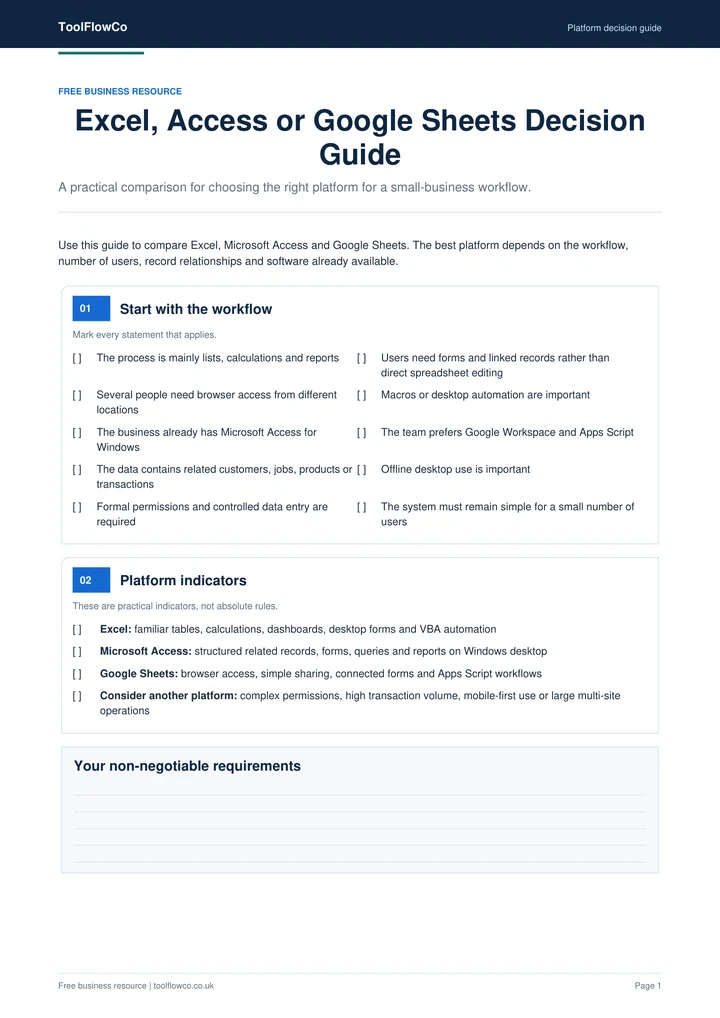
Compare the requirements behind your choice
Start with the work you need to complete, not just the software name. Note which records belong together, who needs access, what documents you must produce and which setup steps your business can support.
What the checklist covers
- Number of users
- Record relationships
- Browser access
- Macro requirements
- Windows availability
- Reporting needs
Using the decision checklist
- Describe one normal task from its first record to its final output.
- List the software and accounts available to the people doing that task.
- Record any requirements for shared use, permissions, backups and handover.
- Compare each shortlisted product with the completed checklist. Ask about any important requirement that is not confirmed in its listing.
A practical comparison example
Suppose a workshop needs customer records, job details, parts usage and invoices. Write those four needs on the checklist, then add the intended users and where they work. Check whether each candidate keeps those records connected and provides the required output. A product that uses your preferred platform is not automatically the right fit for those tasks.
Keep an unresolved question visible rather than marking a requirement as satisfied. For example, multiple locations and simultaneous users are different questions; confirm both when they matter to your workflow.
Excel vs Access vs Google Sheets: the next step
The checklist is a planning resource, not the paid software and not a compatibility guarantee. Keep your completed copy beside the product requirements while comparing options or discussing a custom project.